 Fluent
Why learning words in context matters
During my language-learning journey, I’ve tried a lot of different things, from word lists and simple apps to plain old spaced repetition with Anki. I add words, try to review them and, at some point, get stuck on words that my brain just doesn’t want to absorb. It doesn’t matter how much I try, I always forget them or can’t reproduce them, even after seeing them 5 times in a row.
One solution is to just delete the word, but I don’t quite like that. By then, I’ve reviewed it so many times that deleting it would mean giving up. When I hit those obstacles, I often lose interest in reviewing, so I just stop altogether.
Naturally, I try to pick up my language learning again. And, as I think most of us do, I procrastinate and watch language-learning tutorials on YouTube. It kind of makes you feel great and doesn’t really help you, but sometimes a few tips stick…
Sentence Mining
Sentence mining is a language-learning method where you collect useful sentences from things you read, watch or listen to and then study them, mostly with one word or term as the focus.
After I stopped procrastinating, I tried it, and it mostly clicked for me. It doesn’t mean that I gained fluency in 10 hours, but it really helped me memorize words much more easily.
As an example, let’s take the Ukrainian word for strange: дивний. My native language has little to no connection to Ukrainian, so it is really hard for me to remember/recognize. But it gets easier if I have a sentence like Він носить дивний капелюх (“He is wearing a strange hat”).
Now when I see the term, the context around it helps me remember it better. Is it cheating? Yes, maybe, but I don’t want to review the same term and lose interest over time. After all, language learning should be fun, and I don’t plan on working as an interpreter for the UN.
In addition, I also remember the word капелюх now, without even adding it to my word list. This way of learning brought the fun back to my language-learning journey.
Tools
There are quite a few tools out there to help you.
First, you can find your sentences manually and add them to Anki. Or you can use an online solution like ReadLang or LingQ.
I tried out all of them, including open-source tools like VocabSieve or Learning With Texts if you’re into that.
For me personally, the open-source solutions were really not easy to set up (hosting, Python), and the online solutions have their own methods and ways I didn’t like. I’m on macOS and don’t want to install yet another outdated-looking app like Anki (even though the app itself is great!) or pay a monthly subscription for online services. Some don’t support the way I learn, etc.
So I built an opinionated native macOS app called “Fluent,” mostly for my own needs and those of my friends.
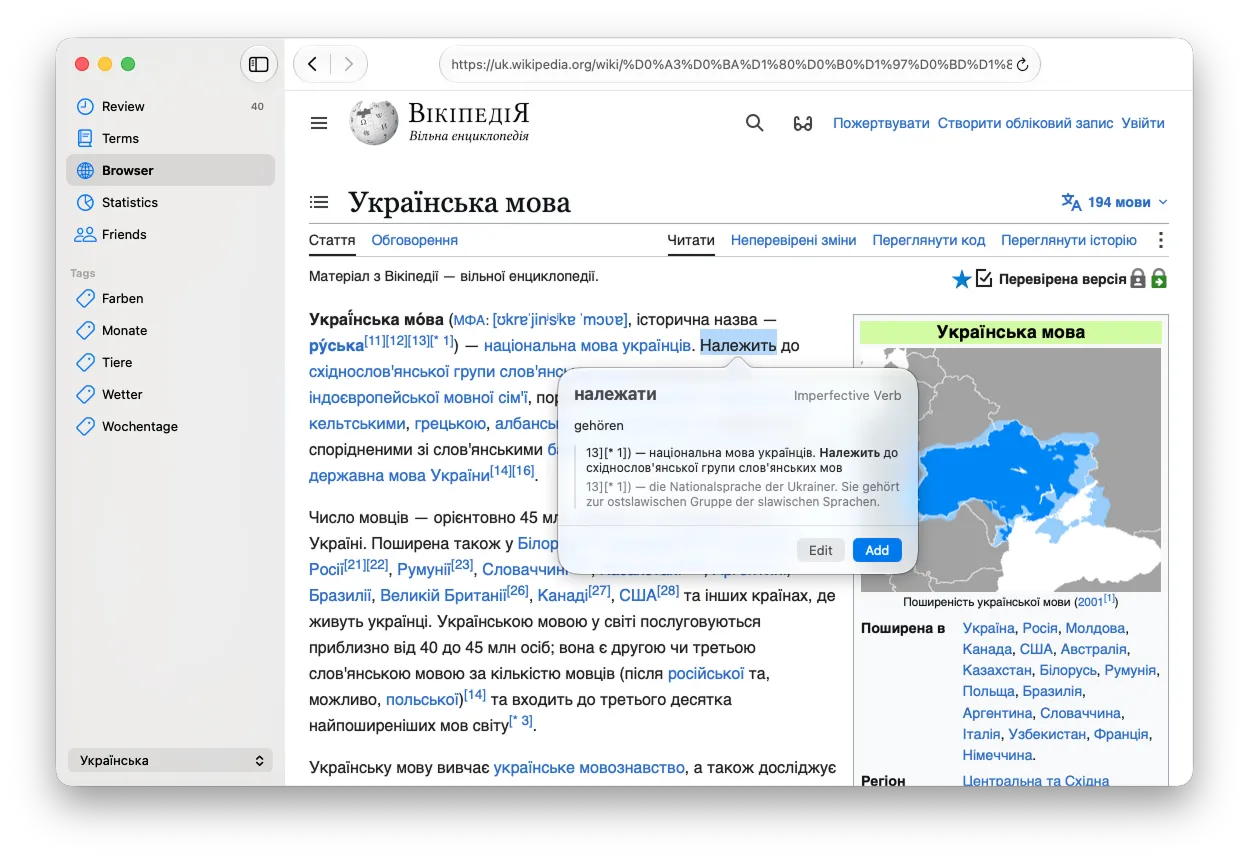
- It is native, so it doesn’t require Qt or Python.
- It is built with privacy in mind, meaning all your data stays on your device rather than in someone’s cloud. It doesn’t require an account, and everything syncs through iCloud.
- You can use AI to translate and add contextual examples. Currently, it works with Google Gemini, but soon it will use Apple Intelligence, so that AI requests will stay completely private.
- It has a built-in browser which you can use to find new terms. It automatically saves the surrounding context so you can then learn the term in context later on.
- Spaced repetition through FSRS.
- You can assign a part of speech to each term and build out your personal dictionary.
- And a lot more.

Download undefined on the App Store. It’s free.